Is There an Official Unleashed App in ChatGPT?
Not from Unleashed Software. The Unleashed plugin in ChatGPT's directory is Logistify for Unleashed, which Logistify builds and runs. On October 23, 2026, ChatGPT's public plugin pages named no app made by Unleashed, and Unleashed's help center had no articles about ChatGPT. Our guide on whether ChatGPT, Claude, Gemini or Copilot can connect to Unleashed has the full check.
Unleashed is cloud software, so no computer needs to be left on. The plugin works through the Unleashed connection Logistify already has. Logistify for Unleashed gives ChatGPT that same connection.
What Can ChatGPT Read and Change in Unleashed?
ChatGPT can read customers, products, sales orders, suppliers, purchase orders and warehouses in an Unleashed account connected to Logistify. With your permission, it can create a sales order from your chat request and push it to Unleashed, push sales orders already saved in Logistify, and import Unleashed customers, products and sales orders into Logistify. That's 16 tools: 11 read and 5 make changes. You ask in ordinary words and ChatGPT picks the tool.
| Tool | Reads or changes | What ChatGPT reads or changes |
|---|---|---|
| Find Unleashed customers | Reads | Customers, by text in the customer code or name |
| Import Unleashed customers into Logistify | Changes | Unleashed customers, brought into Logistify. Each record is read fresh from Unleashed |
| Find Unleashed products | Reads | Products, by product code or description |
| Import Unleashed products into Logistify | Changes | Unleashed products, brought into Logistify. Each record is read fresh from Unleashed |
| List Unleashed sales orders | Reads | A customer's sales orders, or one order by number |
| Find sales orders in Logistify | Reads | Sales orders saved in Logistify |
| Create a sales order and push it to Unleashed | Changes | A new sales order you ask for in chat, created in Logistify and pushed to Unleashed. The customer and products must already be linked to Unleashed and are matched by exact code, a line with no price anywhere is refused, and a retry doesn't create a second order |
| Push sales orders to Unleashed | Changes | Orders saved in Logistify, created in Unleashed as new sales orders. Orders already in Unleashed are left out, and an order with no customer is refused |
| Check Unleashed push results | Reads | The result of a push, so the assistant can tell when an order is in Unleashed |
| Import Unleashed sales orders into Logistify | Changes | Unleashed sales orders, brought into Logistify. Each record is read fresh from Unleashed |
| Find Unleashed suppliers | Reads | Suppliers, by browsing or by the start of the supplier code. Unleashed can't search suppliers by name |
| List Unleashed purchase orders | Reads | A supplier's purchase orders, or one by number |
| List Unleashed warehouses | Reads | The warehouses in the Unleashed account |
| Check what is already in Logistify | Reads | Whether records are already in Logistify |
| List Unleashed connections | Reads | The company's Unleashed connections in Logistify |
| Show the connected Logistify account | Reads | The Logistify account and company the connection uses |
Questions to try in ChatGPT
- Find our customer Harbor Supply in Unleashed and show their sales orders.
- Find products with bracket in the code or description.
- Create an order for Harbor Supply: 12 of product BRK-200, delivered next Friday.
- Push order SO-1002 to Unleashed, then tell me when it's there.
- Import our Unleashed products into Logistify.
- Which warehouses do we have in Unleashed?
How Does ChatGPT Make a Change in Unleashed?
Only when the connection allows changes and you say yes. Logistify's connect page has an Allow changes box, unticked to start with. Unticked, ChatGPT can read but can't change anything. Ticked, it can make the 5 changes in the table, and before each one it shows exactly what will change and waits for a clear yes.
For example, ask "Create an order for Harbor Supply: 12 of product BRK-200, delivered next Friday." ChatGPT finds the customer and items, reads the order back with prices and the delivery date, and waits for your yes. Logistify then creates the order through the same checks as its own screens, and ChatGPT checks the result before telling you it's in Unleashed. A customer or item that isn't already linked to Unleashed in Logistify is refused, with the reason, and a retried request doesn't create a second order. The Unleashed plugin page explains how prices are chosen.
How Do You Add Logistify for Unleashed to ChatGPT?
Logistify for Unleashed is listed in ChatGPT's plugin directory as Logistify for Unleashed, so you can install it from inside ChatGPT in a few clicks. OpenAI approved it on November 10, 2026. OpenAI's help says the directory is available on every ChatGPT plan, on web, desktop and mobile (checked November 13, 2026).
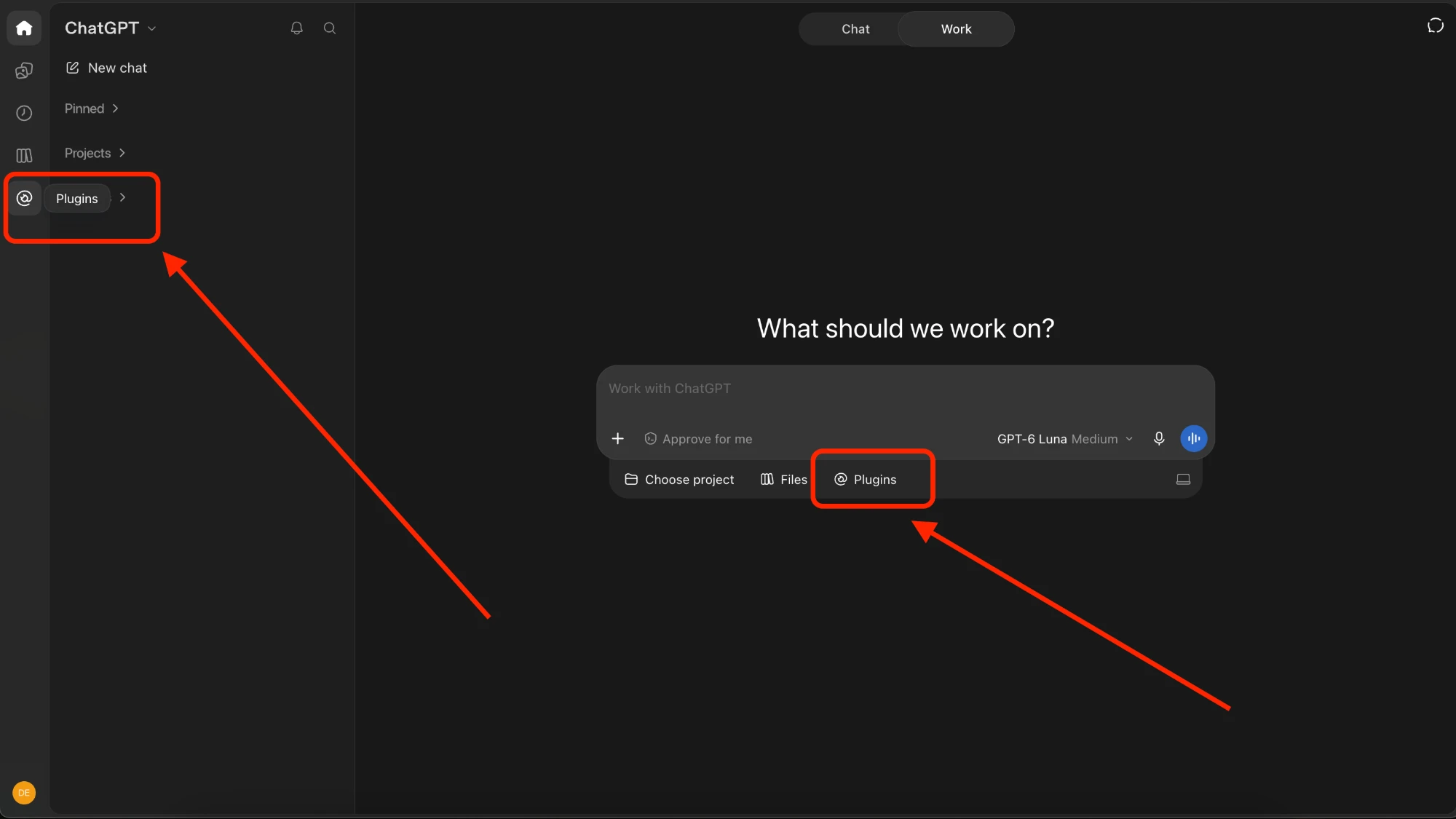
- 1In ChatGPT, open Plugins in the side menu, or select Plugins under the message box.
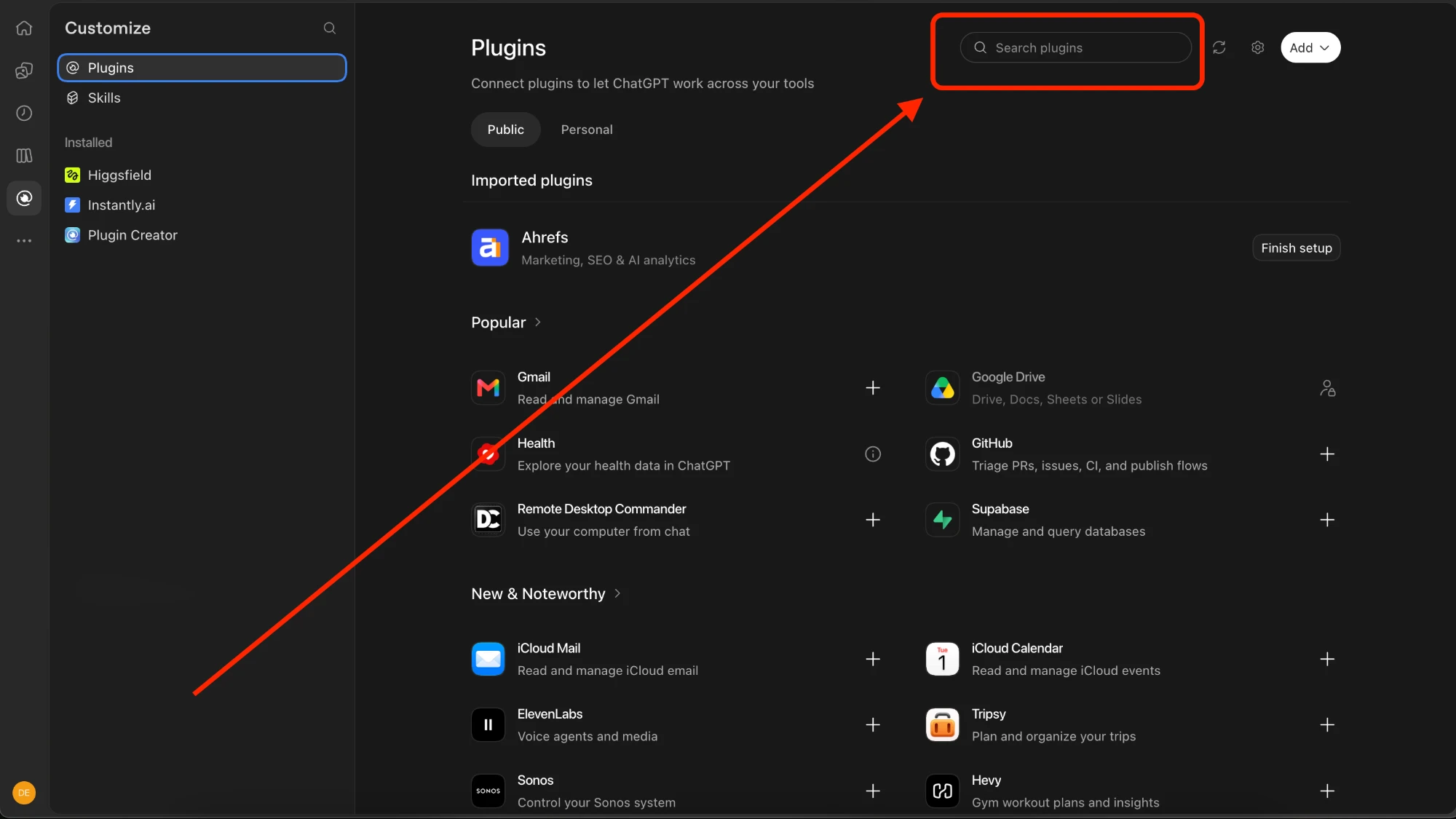
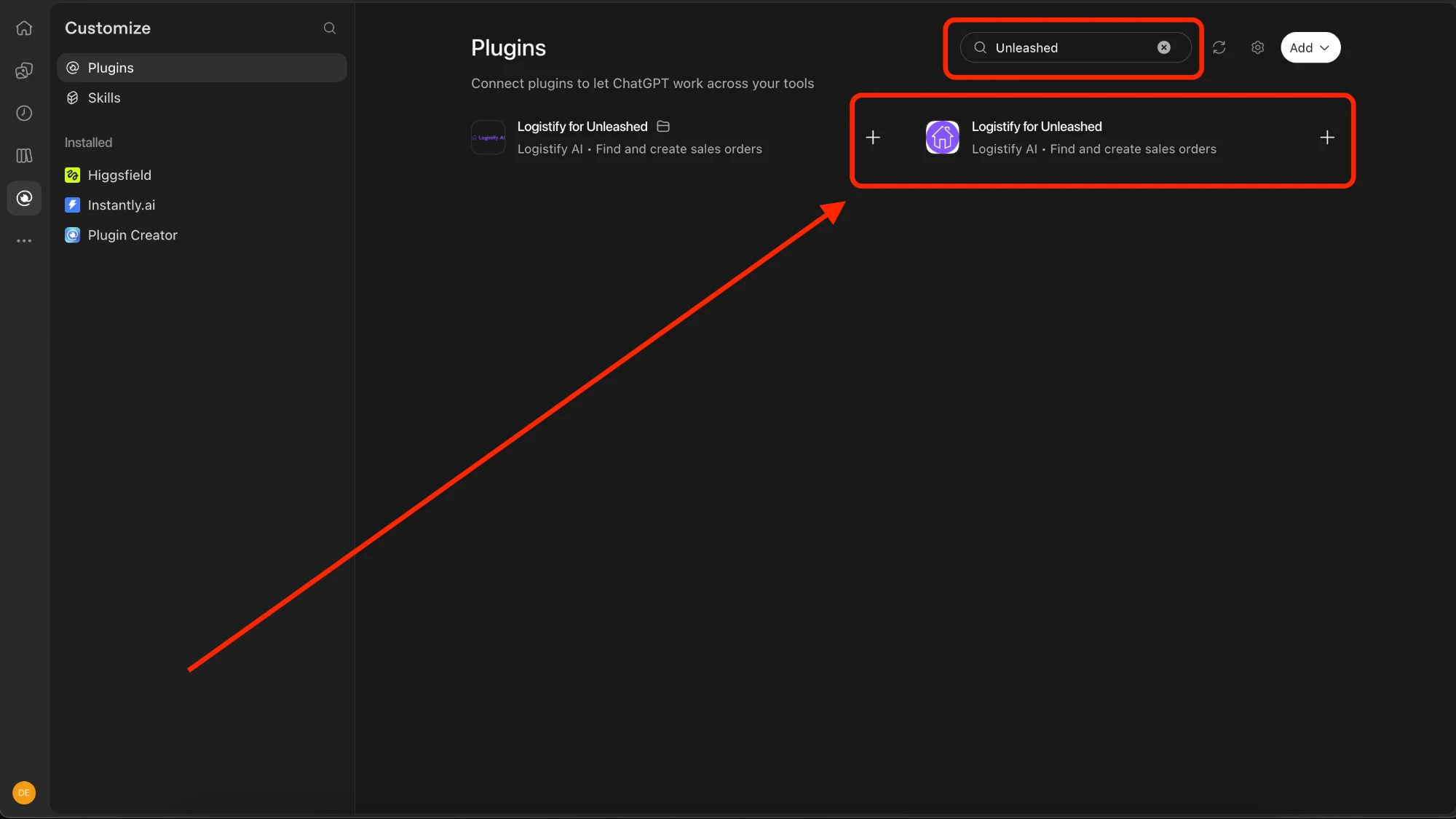
- 2In the Search plugins box, type Unleashed and select Logistify for Unleashed, by Logistify AI.
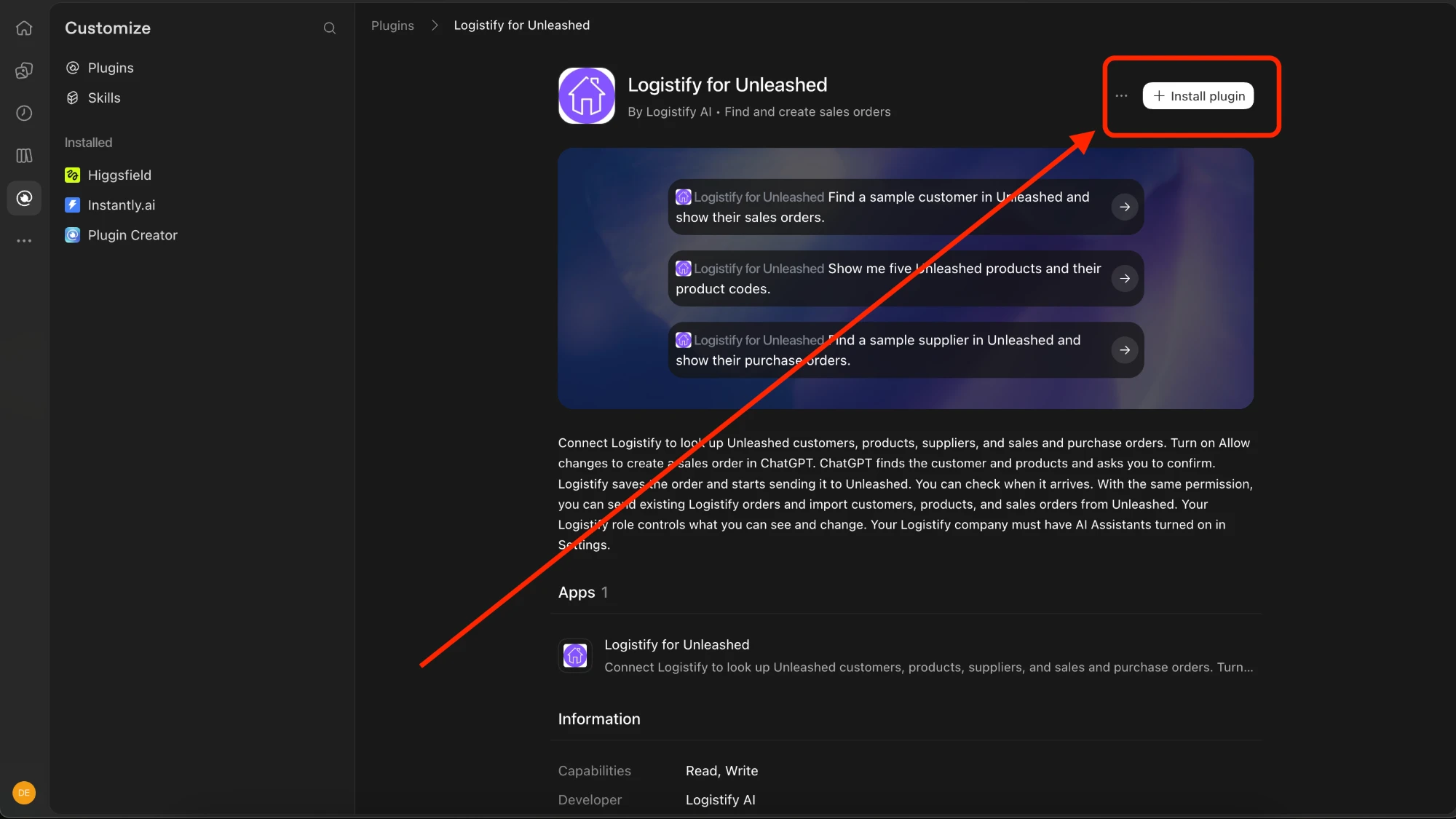
- 3Select Install plugin, then sign in with your Logistify login and choose your company.
- 4On Logistify's connect page, tick Allow changes if ChatGPT should be able to make the changes in the table above. Left unticked, ChatGPT can read but can't change anything.
Or add it by its MCP server address
A workspace admin can also add Logistify for Unleashed by its address, https://mcp.logistify.ai/unleashed/mcp, as a custom MCP server. OpenAI's help says custom MCP servers are for ChatGPT Business and Enterprise/Edu workspaces on ChatGPT web, and that on Business only admins and owners can add and publish them (checked November 3, 2026).
- 1In ChatGPT, open Plugins, select the plus button, then Add custom MCP server.
- 2Name it Logistify for Unleashed, enter https://mcp.logistify.ai/unleashed/mcp, and choose OAuth for authentication.
- 3Accept the warning, select Create as a plugin, and review the tools ChatGPT finds.
- 4An admin or owner publishes it for the workspace. Members then sign in with your Logistify login and choose your company the first time they use it.
Who Can Use It in ChatGPT?
ChatGPT users install it from the plugin directory. OpenAI says the directory is available on every ChatGPT plan, and whether you can install a given plugin depends on your plan, workspace, role and region. In a Business or Enterprise workspace, an admin can choose which plugins members may install.
On the Logistify side
- A Logistify plan with Unleashed connected. Starter, at $99 per month per company, includes the plugin without any managed service. Core, Business and Enterprise include it at no extra cost.
- A company admin turns on Assistant Connectors in Logistify, under Settings, Features. This allows the company's Unleashed data to be sent to OpenAI when its people use the plugin.
- For now, people with the Admin or Customer Success Manager role in Logistify can connect. Each kind of data follows the role rules of the Logistify screen that shows it.
What Is Shared With OpenAI, and How Do You Disconnect?
What ChatGPT reads through the plugin is sent to OpenAI. Results leave out addresses, email addresses, phone numbers, notes and bank details. Each connection covers one company.
To disconnect, remove the plugin in ChatGPT's settings, or open the company in Logistify and press Disconnect under Settings, ChatGPT and Claude, Connected assistants. That list shows every assistant connected to the company. Removal takes effect on the next request, and an admin who turns off Assistant Connectors stops every connection. What we keep, and for how long, is in section 4 of our privacy policy.
What Doesn't the Plugin Do?
- It doesn't change anything else in Unleashed: no quotes, no edits or deletes of existing Unleashed records, no stock adjustments and no purchase orders.
- It doesn't guess. A customer or product that isn't already linked to Unleashed in Logistify stops the order, and the assistant tells you why.
- It can't search Unleashed suppliers by name, because Unleashed can't. Browse them, or search by the start of the supplier code.
Does Logistify for Unleashed Work in Other Assistants?
Yes. It also works in Claude, Microsoft Copilot, Gemini and Perplexity. The Unleashed plugin overview lists every tool and links to the setup for each assistant.